Pawlock for iPhone: blocking, setup, plans and privacy
Pawlock is an iPhone app for people who want to block distracting apps and websites during work, study or rest. It uses Apple’s Screen Time controls for instant locks and recurring schedules. It is a self-control tool, not a medical treatment or a guarantee of improved productivity.
Version note: the US App Store lists Pawlock 1.0.5, checked October 2, 2026. This version requires Pro access. Choose monthly Pro or a one-time lifetime purchase, or restore an existing purchase. Check your regional App Store and the in-app purchase screen for current availability, prices and trial eligibility.
Pawlock at a glance
- Platform
- iPhone, iOS 18.0 or later. Check the App Store for current compatibility.
- Blocking
- Selected apps, app categories and websites using Apple Screen Time permission.
- Schedules
- Instant timed locks and recurring scheduled blocks. Active scheduled locks cannot be edited, disabled or deleted inside Pawlock.
- Account
- No Pawlock account or sign-up required. Purchases use your Apple account.
- Plans
- Monthly Pro with a 7-day free trial for eligible users; lifetime access with one payment and no trial.
- Data
- Screen Time usage stays on device. Product analytics, crash diagnostics and purchase status are processed by Firebase and RevenueCat.
How to block an app on iPhone with Pawlock
- Install Pawlock from the App Store and complete onboarding.
- Grant Screen Time permission. Blocking cannot work without this permission.
- Choose apps, categories or websites in Apple’s system picker and confirm the selection.
- Purchase monthly or lifetime Pro, or restore an existing purchase, to activate your plan.
- Start a timed lock in Lock Now or create a recurring program. For a scheduled test, choose a window of at least 15 minutes.
- Open an app you selected and check that the shield appears. Leave essential apps available and choose your times carefully.
How to block apps at the same time every day
For a repeatable study session, create a program that blocks selected social apps from 19:00 to 20:00 every day. These are example settings, not a measured result or a required routine.
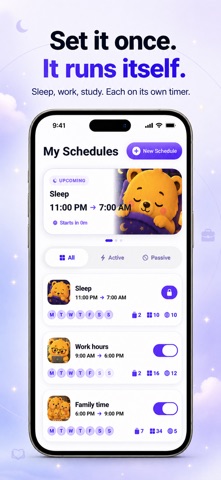
- Open My Schedules and choose New Schedule. Give the program a name such as Evening study.
- Choose the distracting apps or websites in the system picker and confirm. For a first test, choose one non-essential app rather than a whole category.
- Set the start to 19:00 and the end to 20:00. Select all seven days for a daily routine; select Monday through Friday if you only need weekdays.
- Save the program and check that it is enabled and that the displayed days and times match your plan. Complete Screen Time permission and Pro activation if prompted.
- At the scheduled start, open the selected app and check for the blocking shield. At the end, check access again. Another overlapping program or timed lock may keep the app blocked.
Before relying on the routine
Try a separate window of at least 15 minutes with a non-essential app first. Check the selected days, start/end times, enabled state and Screen Time permission if the shield does not appear. A saved program alone does not prove that blocking worked on your device.
An active scheduled lock cannot be edited, disabled or deleted inside Pawlock. Choose the duration before it starts and leave essential apps available. Pawlock relies on Apple Screen Time and iOS permissions; it does not promise that every possible workaround is prevented.
Questions before you choose
Who is Pawlock for?
People managing their own iPhone use: for example, blocking social apps during a study session or scheduling fewer distractions at bedtime. It does not promise a particular reduction in screen time.
How is it different from Apple Screen Time?
Pawlock uses Apple’s Screen Time technology and adds its own instant-lock and recurring-program interface. Its active scheduled locks cannot be edited, disabled or deleted inside Pawlock. It still depends on iOS permissions and behavior; it is not an independent replacement for Apple’s controls.
Can Pawlock block Instagram, TikTok, YouTube and websites?
Choose available apps or categories in Apple’s system picker, or select websites for blocking. Blocking applies to what you select; Pawlock does not identify individual posts or filter a specific social feed. Behavior depends on Apple’s Screen Time framework.
Is Pawlock free?
Pawlock 1.0.5 requires Pro access. Eligible Apple accounts can try monthly Pro free for 7 days; it renews at the price shown before purchase unless canceled. Lifetime access is a one-time purchase without a free trial. Check the purchase screen for your price and eligibility.
Does lifetime access include a free trial?
No. Lifetime is one payment without a free trial or automatic renewal. The monthly subscription offers a 7-day free trial only when your Apple account is eligible. After the trial it renews at the price shown before purchase unless canceled.
How much does Pawlock cost?
Prices vary by App Store country and currency. The app shows the local price and trial eligibility before purchase. Review the monthly and lifetime options there; this page does not promise a worldwide fixed price.
How do I cancel or restore Pro?
Manage or cancel the monthly subscription in your Apple account’s subscriptions. Use Restore Purchases on Pawlock’s paywall with the Apple account that made the purchase. Lifetime has no recurring subscription to cancel. Existing legacy yearly subscribers retain their Pro entitlement.
What if my app selection does not appear after Done?
Check Screen Time permission, reopen the picker, choose an individual app and confirm again. Check whether a category was selected instead of an individual app. If it still fails, send support your iPhone model, iOS version, Pawlock version and the steps you followed. Do not send private Screen Time content. We have not verified a universal fix for this symptom.
Does Pawlock send my Screen Time history to a server?
The app’s Screen Time reports are processed on the device. Product-interaction events and crash diagnostics go to Firebase, and RevenueCat manages purchase status. These are different from the names and usage history of the apps in your Screen Time reports. See the privacy policy for details.
Does this page describe an Android app or a parental control service?
This guide describes Pawlock for iPhone and self-directed use. It does not claim remote parental monitoring or Android compatibility for the iPhone version.
Developer, support and sources
Pawlock is developed by Safak Selim Sofioglu, the seller named on its App Store listing. This is the developer’s product guide, not an independent review. Store availability and prices are controlled by the App Store. Research articles on our site explain their sources separately and are not clinical evidence that Pawlock itself improves health or productivity.